Complete User Guide
Get a working retirement plan in minutes — then use the AI assistant, Adaptive Strategy engine, and stress tests to know it will hold up.
1. Getting Started & Quick Start
Create Your Free Account
Signing up takes less than a minute — no credit card required.
- Click "Sign Up" or "Try as guest" from the homepage (Google sign-in is also supported).
- Enter your email and create a secure password, or continue with Google.
- Verify your email if prompted (check your spam folder if needed).
- You are taken to Quick Start to build your first plan.
Quick Start: A Working Plan in Minutes
Quick Start asks 13–16 questions and returns a complete, projected plan. You answer:
- Age, marital status, work profile, state of residence
- Whether you are working or retired, and target retirement age
- Income, monthly expenses, and total savings (account breakdown optional)
- Social Security expectations and planned annual retirement spending
- Risk tolerance and how hands-on you want plan updates to be
Submit, and Praxion runs your first Roth + withdrawal simulation, Monte Carlo, and Financial Health score — then lands you on the Dashboard.
Prefer a Single Tool First?
Not ready for a full plan? Several public tools work without signing up — each answers one question and deep-links you to Quick Start when you want more:
- Retirement Income Planner — sketch your 3-bucket retirement paycheck
- Roth Conversion Calculator — one-year conversion breakeven
- Retirement Tax Planner — lifetime tax exposure at a glance
- 401(k) / IRA Withdrawal Calculator — sequence + tax cost
- Withdrawal Strategy Calculator — 4% Rule vs Guardrails vs Fixed
- Social Security Break-Even — the classic claiming-age comparison
- Medicare Cost Estimator — Part B/D + IRMAA over time
- HSA Retirement Calculator — the triple tax advantage projected out
2. Building & Refining Your Profile
Your profile is your complete retirement plan — all of your accounts, income, expenses, goals, and assumptions. After Quick Start, add detail anytime in Edit Profile.
What it is: The full editor for everything in your plan.
Where to find it: Left sidebar → Edit Profile (route /onboardingv2), or the Profile Summary on the dashboard.
How to use it: Open any card to edit that topic, then click Done to save. You do not have to fill everything at once.
The Edit Profile Card Dashboard
Edit Profile is a card dashboard — not a long linear wizard. There are 16 cards organized into 6 sections. Tap a card to open a focused editor for that topic:
- Personal & household (ages, marital status, state)
- Work income (salary, growth, spouse)
- Monthly spending
- Debts & liabilities
- Housing & mortgage
- Healthcare & insurance
- Rental property income
- Retirement accounts (401k, IRA, Roth, HSA)
- Taxable investments & cash
- Retirement goals & Social Security
- Pension income
- Risk tolerance & goals
- Investment preferences
- Growth rates
- Tax & withdrawal strategy
- Life events
📸 Edit Profile: completeness header and Modeling Assumptions

Sample plan with made-up figures: every section complete, with 4 assumptions still using estimates
Profile Completeness
A completeness percentage (shown in the header) tracks how much of your profile is filled in. Higher completeness means more accurate projections — and it unlocks more of the app.
Life Events
A life event is a future income or expense your standard profile does not cover — inheritance, home renovation, tuition, business sale, sabbatical. Optional, but they make your projection noticeably more realistic.
What it is: One-time, recurring, or permanent income/expense items placed on your plan timeline.
Where to find it: Edit Profile → Strategy & Assumptions → Life events card. You can also add one inline from any year of the Financial Journey table, or sweep one in Scenario Studio.
How to use it: Click Add Life Event, then describe it and set the details below. Use Edit, Clone, or Delete to manage the list.
What you set for each event
- Name — a short description (an icon is chosen automatically from keywords)
- Category — Income or Expense
- Type — One-time, Recurring (with a duration in years/months), or Permanent
- Start age — when it begins (defaults to your current age)
- Amount — a one-time total, or an annual amount for recurring/permanent items
- Annual growth/decline rate — to inflate or taper the amount over time (for example, rising tuition)
- Tax treatment (income only) — Tax-free (e.g. gift or inheritance), Ordinary income, or Capital gains
- Notes — optional context for your future self
- Divorce: alimony or child support as recurring income/expense (with a duration), plus legal fees as a one-time expense
- New child: childcare and child-related costs as recurring expenses, then college tuition as a 4-year recurring expense starting at the child's age 18
- Disability or career change: adjust income at the transition age, plus any insurance payments
- Relocation or a new business: moving/startup costs as expenses, plus any income changes
3. Your Dashboard (Modes & Hero)
The Dashboard is your home base. It adapts to how complete your plan is and how much depth you want.
Three Dashboard Modes
Praxion picks the right mode as your plan progresses — Guided during Quick Start, Standard as you refine your profile, and Power once you are ready for the full workspace. You can change it anytime from the mode menu on the Overview.
The Plan Health Command Center (Overview)
The Overview hero brings your most important signals together on one screen:
- Financial Health — a 0–100 score with a tier (At risk / Fair / Good).
- Net worth and years to retirement with an on-track status.
- Retirement goal — the savings you need for your target lifestyle.
- Your Retirement Plan — a gauge showing how often your essential spending stays funded across 1,000 simulated markets, with a status (On track, Needs attention, Room to strengthen, or At risk). While the simulations run, it shows a live estimate so far that steadies as more scenarios finish.
- Outcome range — what your savings could be worth at the end of your plan, in today's dollars. Every scenario counts; one that runs out counts as $0.
- Data Health gauge — how confident Praxion is in your numbers (click to see the full tab).
- Needs Attention rail plus a personalized Intelligence Feed.
- Run AI Scenario Analysis — kicks off an AI Review (see section 8).
📸 Dashboard: the Overview

Sample plan with made-up figures: on track, $6,637/mo income, money lasts beyond age 90
4. The Dashboard Tabs
The dashboard shows seven tabs in both Standard and Power mode. Some tabs open as your profile fills in, and the premium tabs prompt guests to create a free account.
📸 The seven-tab strip

Overview is home. Until your profile is complete, some deeper tabs first ask you to add or confirm a few details.
1. Overview (always available)
Your Plan Health Command Center. Financial Health score, Net Worth, Retirement Goal, the "Your Retirement Plan" gauge, Data Health gauge, Needs Attention rail, and the Intelligence Feed. Also home to the compact Tax & Liquidity summary and the "Run AI Scenario Analysis" button. This is where most sessions start and end.
2. Analysis (opens at 60% complete)
The deep-dive view. Monte Carlo summary, cash-flow summary, the stress boundary ("Cliff's Edge"), AI insights, plus tax-cliff, Social Security taxation, and future-tax-risk cards. Open this when you want the "why" behind your Financial Health score.
3. Projections (opens at 60% complete)
Lifetime numbers at a glance. Earliest retirement age, total retirement spending, lifetime taxes, and RMD impact — each card links straight to the underlying chart or table. Best tab for "what will this look like over 30 years?" questions.
4. My Plan (always available)
Your phase-by-phase income vs expenses, a Strategic Blueprint of the moves that matter, and an execution sidebar you can work down.
5. Income Planner (opens at 80%; sign-in required)
A dedicated retirement-income workspace with seven sub-tabs — Inputs, Buckets, Waterfall, Strategies, Stress, Sequence, and Monitor. Slide live inputs to test ideas without changing your saved profile until you choose to apply.
📸 Income Planner: three buckets structured for years-of-runway coverage

Sample plan with made-up figures: about $142K / $284K / $1.7M across cash, income & stability, and long-term growth
6. Data Health (opens at 80%; sign-in required)
How confident Praxion is in your numbers. Shows the Data Health score, balance reconciliation against your statements, deterministic plan-health signals, a market-shock simulation (−5% / −10% / −20%), AI nudges, and your Balance History. See section 8 for the details.
7. AI Optimizer (opens at 100%; sign-in required)
Praxion's Adaptive Strategy engine. Compares your live portfolio against your plan, simulates market drops, and runs an AI generator/critic loop to suggest changes you can apply or revert — with a Strategy Change History and one-click undo. See section 8.
5. Financial Journey (Year-by-Year)
The Financial Journey is the detailed year-by-year projection from today through the end of your plan.
What it is: A full year-by-year table of income, contributions, balances, taxes, withdrawals, and healthcare.
Where to find it: Left sidebar → Financial Journey (route /projection-details).
How to use it: Scroll the years, hover columns for breakdowns, open the Financial Order of Operations on any row, and edit cells to test changes.
What You See Each Year
- Core: Year, Age, Phase (Working / Retired)
- Income: Salary, bonus, RSUs, Social Security, pension, rental, dividends, interest
- Contributions: 401(k), IRA, Roth, HSA with catch-up tracking
- Balances: Traditional & Roth 401(k), Traditional & Roth IRA, HSA, brokerage, cash
- Taxes: Federal, state, FICA, Medicare, capital gains, effective rate
- Withdrawals: By account, RMDs, and Roth conversions
- Healthcare: Premiums, IRMAA surcharges, out-of-pocket
Financial Order of Operations (FOP)
Click the clipboard icon on any row to open the Financial Order of Operations — a deep breakdown of how money flows that year, including:
- 💰 Cash flow: all income sources and how expenses are covered
- 📊 Tax strategy: federal bracket, effective rate, total taxes, and opportunities
- 🏛️ Social Security taxation: whether benefits are taxed at 0%, 50%, or 85%, and how to reduce it
- 🔄 Roth conversions: amounts, tax cost, and funding sources
- 📋 RMD details: distributions by account and QCD opportunities
- ⚠️ Sequence-of-returns risk: alerts for the critical first five retirement years
📸 Financial Journey with the Financial Order of Operations open

Sample plan with made-up figures: the 2026 year for a retiree, opened from the year-by-year table
Editable Cells
Many cells are editable — click to override a value and see the effect ripple through your plan:
- Expenses (personal, healthcare)
- Contribution amounts
- Roth conversion amounts
- Account balances
6. Action Plan & Analysis
The Action Plan turns your projection into a single, impact-ranked list of moves — with a plan-health read at the top and a place to record your own decision and notes on each one.
What it is: Your plan's health plus a prioritized list of modeled moves you can review, decide on, and annotate.
Where to find it: Left sidebar → Action Plan & Analysis (route /action-plan).
How to use it: Read the header, work the moves top-down by modeled impact, mark each Reviewed / Planning to do / Not for me, and open See details for the rationale.
The header: Plan Health + Tax-optimization headroom
- Plan Health — the same 0–100 score shown on your dashboard (whether the plan lasts, in the model). One number, in one place.
- Tax-optimization headroom — a separate, qualitative read (Significant / Moderate / Limited) of how much modeled tax efficiency may still be on the table. It's an opportunity signal, not a safety score.
- Three factors sit under it — IRMAA control, RMD flexibility, and Tax efficiency — each linking to the move that addresses it.
The Runway (retirement phases)
A time-spine showing where you are now and how the plan moves through five phases:
- Pre-retirement: now until retirement — maximize savings and tax efficiency
- Early retirement: bridge years before RMDs — often prime Roth-conversion years
- Mid retirement: settle into the withdrawal plan
- RMD-active: Required Minimum Distributions begin — manage the tax bill
- Late retirement: preserve wealth; focus on healthcare and longevity
Your next moves
- Impact-ranked: highest modeled impact first; each card shows the modeled figures behind it.
- You decide: mark each move Reviewed, Planning to do, or Not for me; a “Decided on N of M” tally tracks your progress. It's your own record — it never changes the plan's health score.
- My Notes & Questions: jot notes on any move (optionally tagged for your CPA, spouse, or advisor) and export them.
- See details: open a card for the full modeled breakdown.
What the moves cover
- 💰 Savings optimization: 401(k), IRA, and catch-up contributions
- 📊 Tax strategy: Roth conversions, bracket management, tax-loss harvesting
- 🏛️ Social Security: claiming age and spousal strategies
- 💸 Withdrawal strategy: account sequencing and RMD management
- 🏥 Healthcare: Medicare planning, HSA optimization, IRMAA awareness
📸 Action Plan: Plan Health, tax-optimization headroom, the Runway, and your next moves
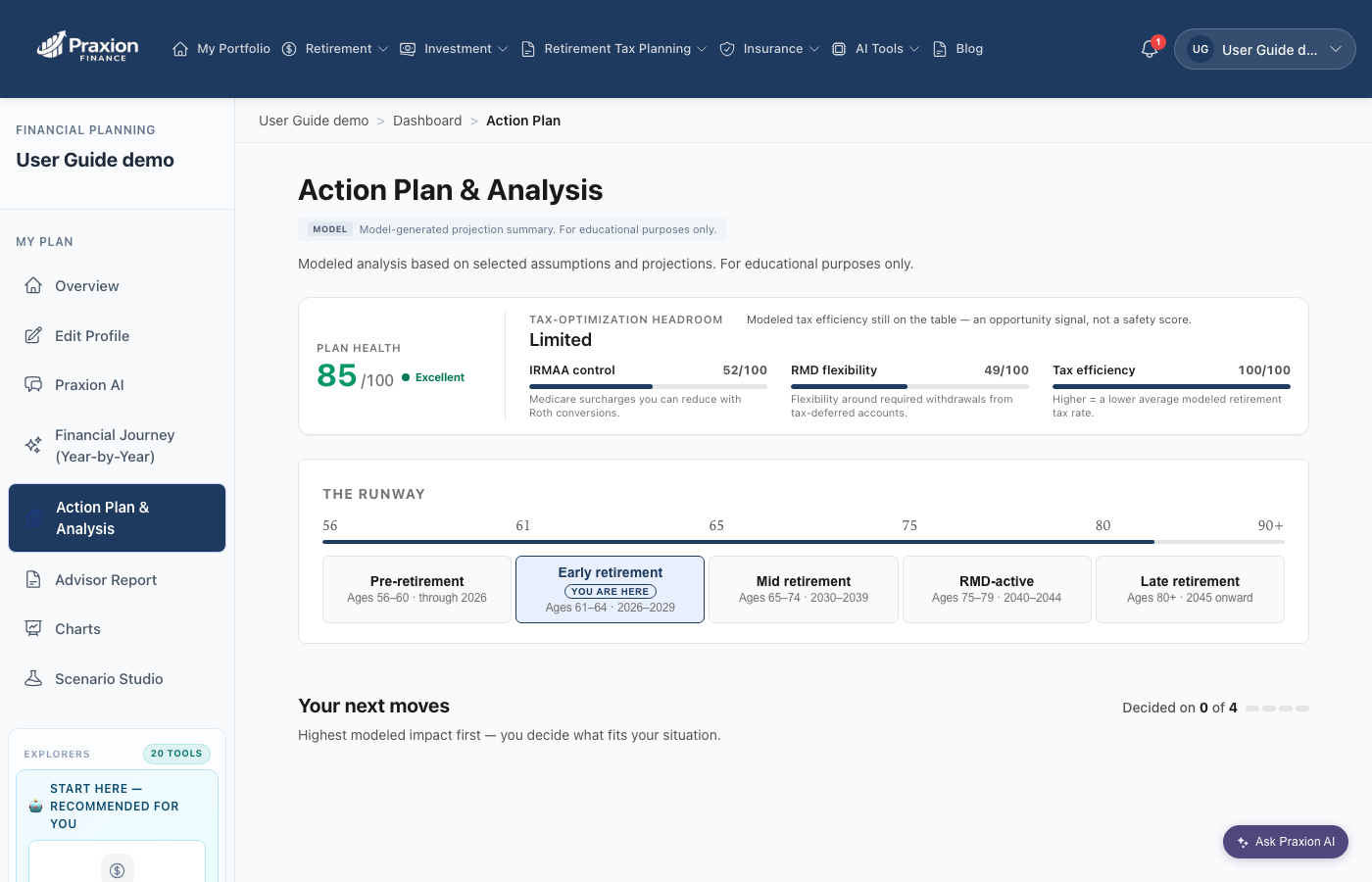
Sample plan with made-up figures
7. Praxion AI Assistant
Praxion AI is your built-in AI planning assistant. It can answer questions about your plan, run what-ifs, and walk you through specific decisions — grounded in your actual profile.
What it is: A conversational assistant that can analyze your plan, run tools, and give structured decision answers.
Where to find it: The floating "Ask Praxion AI" button (bottom-right on every page) opens the chat drawer. There is also a full-page view at /praxion-ai, and "Improve your plan" cards throughout the app offer "Answer with Praxion AI".
How to use it: Ask a question in plain language, or tap a suggested prompt. Share or export any answer.
📸 Praxion AI: the drawer with suggested prompts

Opens from the floating 'Ask Praxion AI' button on every page
What Praxion AI Can Do
- Answer questions about your plan and run what-if scenarios
- Run Roth, Social Security, and tax optimization analysis on demand
- Help fill in or update your profile, with deep links to the right Edit Profile section
- Run Income Planner scenarios from the conversation
- Give structured decision answers for specific questions — for example, a Roth vs Traditional 401(k) split or HSA contribution priority
8. AI & Automation Features
Beyond the chat assistant, Praxion runs several AI-driven features that monitor and improve your plan.
🤖 AI Review (Scenario Analysis)
What it is: An on-demand AI review that proposes Roth and strategy edits you can apply with one click.
Where to find it: Overview hero → "Run AI Scenario Analysis".
How to use it: Run it, review the proposed changes in the modal, and apply the ones you want.
✨ Adaptive Strategy
What it is: The engine behind the AI Optimizer tab. Continuously compares your actual portfolio to your plan path, notices drift, and generates AI-vetted rebalancing or tax moves — each with a projected impact.
Where to find it: Dashboard → AI Optimizer tab.
How to use it: Review a recommendation, hit Apply (or Revert). The Strategy Change History tracks every accept/revert with one-click undo.
📸 AI Optimizer tab: this year's Roth picture, a portfolio check, and a market-drop simulator

Sample plan with made-up figures on a complete profile in Power mode
💙 Data Health
What it is: A plan-confidence workspace. Rolls up a Data Health score, balance reconciliation, deterministic plan-health signals, a market-shock simulation, and AI nudges into one tab.
Where to find it: Dashboard → Data Health tab, or the Data Health gauge on the Overview.
How to use it: Review your signals, reconcile balances against your statements, run the −5% / −10% / −20% shock test, and act on AI nudges.
📸 Data Health tab: how current your balances are

Sample plan with made-up figures: balances just entered, so every account reads 100%
🧾 Balance Reconciliation
What it is: A side-by-side check of your Praxion balances against the statement values you enter. If they diverge, Praxion flags the account so projections do not drift silently.
Where to find it: Data Health tab → Balance Reconciliation row.
How to use it: Enter your latest statement values as they arrive. Praxion marks reconciled accounts green and stale accounts yellow, and lifts your Data Health score as you close gaps.
🎯 Scenario Lab
What it is: The Scenario Lab lets you try changes — such as retirement age, Social Security age, spending, or investment mix — and see how your Monte Carlo result moves. It opens on your plan's own result right away. The Conservative and Optimistic what-if scenarios build in the background, and the sliders unlock in a few minutes.
Where to find it: Overview: the Open The Scenario Lab button.
How to use it: Open The Scenario Lab, move the sliders once they unlock, then choose "Apply to Base Plan" to keep the changes.
📸 Overview: Plan Health Command Center and the way into the Scenario Lab

Sample plan with made-up figures: 100% on track, $2.1M investable net worth
🛡️ Plan Stewardship
What it is: Controls how much Praxion automates monitoring and plan improvements.
Where to find it: Settings → Notifications → Plan Stewardship.
How to use it: Choose Auto-Apply (the default: applies modeled Roth updates within guardrails and shows you what changed), Watch & Notify (you approve before anything applies), or Manual Only (you make all changes yourself).
🔔 Praxion Alerts
What it is: Your notification inbox: alerts about market drift, IRMAA cliffs, and stale balances, plus plan, Roth, and cash-flow nudges.
Where to find it: The bell icon in the top navigation (visible once you have signed in).
How to use it: Open the bell to review and act on messages as they arrive.
9. Planning Tools
Praxion's tools live in three places: the My Plan group (your core planning surfaces), the Explorers catalog (single-purpose tools you dip into), and the desktop topic dropdowns (Retirement, Investment, Retirement Tax Planning, Insurance, AI Tools).
My Plan
- Overview — your dashboard (
/dashboard) - Edit Profile — your plan inputs (
/onboardingv2) — appears once you have a profile - Financial Journey — year-by-year detail (
/projection-details) - Action Plan & Analysis — prioritized recommendations (
/action-plan) - Advisor Report — an exportable long-form report (
/report) - Charts — visual projections of net worth, income, and tax exposure (
/charts) - Scenario Studio — single-variable what-if sweep (
/scenario-studio)
/praxion-ai.Explorers
Explorers is a catalog of focused tools — pick one, get one answer, go back to your dashboard. On desktop it is a section of the left sidebar that groups the tools under Core Planning, Tax & Optimization, Stress Tests & Markets, and Lifestyle & Longevity, with a few more under "Advanced tools". On mobile it is an expandable menu section. Some of the tools:
/rmd-insights), Tax & Liquidity Planner (/tax-liquidity-planner), Estate Tracker, Life Expectancy, Withdrawal Guardrails, Spending Trade-offs, Inflation Dashboard, Cash Flow Analysis, and HNW Insights (see section 11) — each is a direct route reached from the relevant dashboard card.📸 Mobile menu: My Plan, plus the Explorers and topic dropdowns

On mobile, Praxion AI isn't in this list; tap the round sparkle button at the bottom right
🎲 Monte Carlo
Runs up to 1,000 randomized market simulations to estimate the probability your plan succeeds, accounting for market volatility and the order of returns.
The outcome range and the ending-balance chart include every scenario. A scenario that runs out of money counts as $0 and appears in the first bar, labeled "Ran out ($0)".
📸 Monte Carlo: your result across 1,000 simulated markets
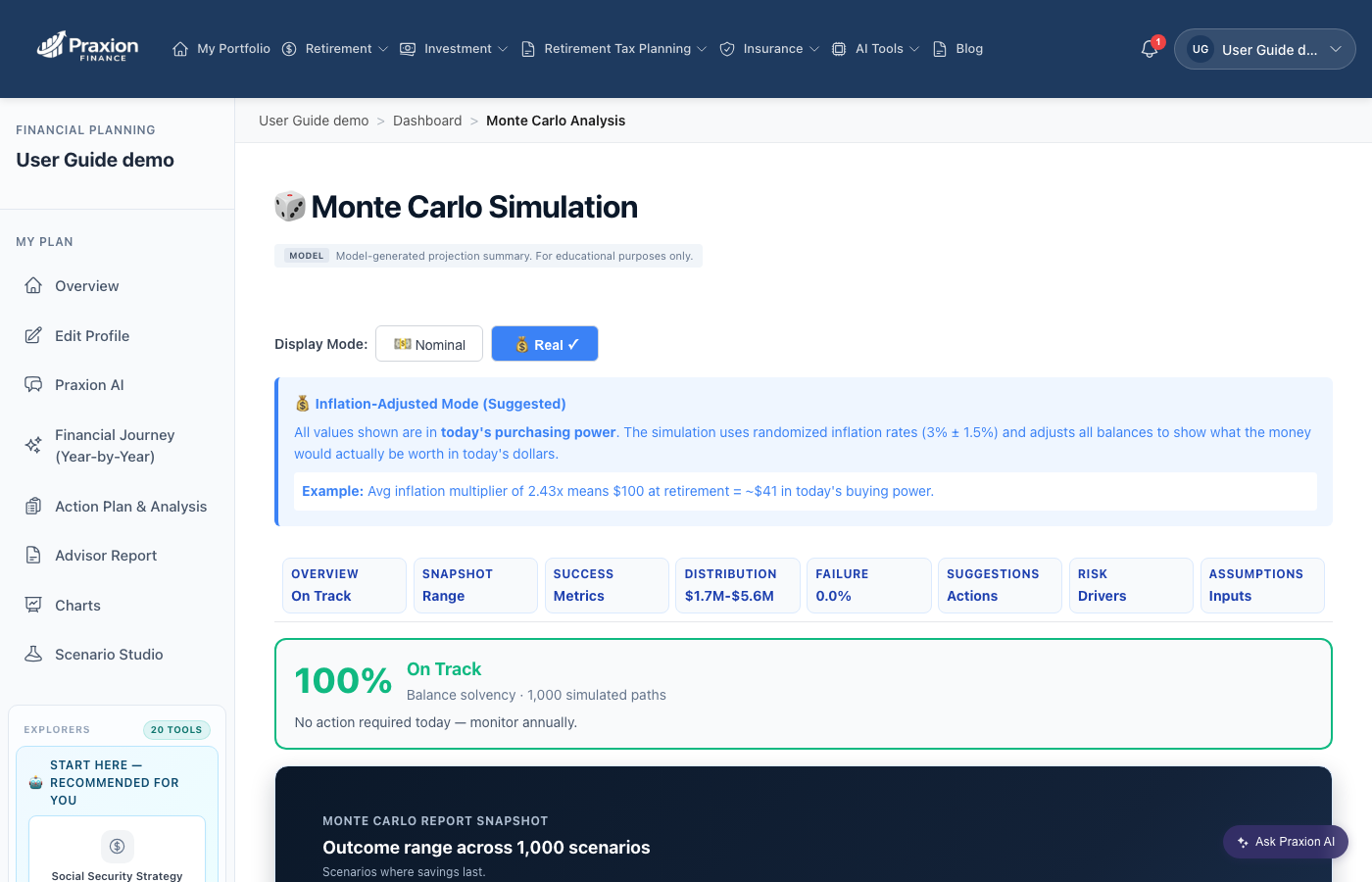
Sample plan with made-up figures
⚖️ Strategy Comparison
Compare withdrawal strategies side by side to see how each one plays out for your plan.
- Methods (how much to withdraw): Expense-Based, Fixed Percentage (4% of Tax-Deferred), Manual (Fixed Amount), Guardrails, Hybrid, Phased Spending, and RMD Spending (Divisor Pace)
- Modes (which accounts to tap first): Static (Configured Bucket Order), AI Tax-Optimized (Adaptive), and Policy Engine (Constraint-Driven)
- Compared on: lifetime taxes, Roth (tax-free) and traditional (taxable) balances, total assets, after-tax wealth, success rate, and years covered
📊 Advisor Report
What it is: A long-form, narrated report — the version you would hand to an advisor or spouse. Sections cover strategy, taxes, projections, risks, and next steps.
Where to find it: My Plan → Advisor Report (route /report).
How to use it: Generate the report and review it in the browser, then use Print / Save PDF to keep a copy. Requires 100% completeness and a free account.
10. Scenario Studio
Scenario Studio is where you pressure-test your plan. Pick a preset question, get a plain-English answer, or configure your own custom sweep — nothing you do here changes your saved profile until you decide to apply it.
What it is: A dedicated workspace for pre-configured scenario templates, decision cards, and custom variable sweeps.
Where to find it: Left sidebar → Scenario Studio (route /scenario-studio).
How to use it: Start with a template (fastest), review the decision card, or switch to Advanced for a custom sweep.
Three Modes
Quick Start Templates
The Explore tab opens with a grid of preset templates — each answers one common retirement question with pre-configured assumptions. Filter chips (All Templates · Retirement · Savings · Tax · Stress test · Legacy) narrow the grid. Recent templates include:
- When Should I Retire? — compare modeled retirement ages and their trade-offs in wealth, taxes, and lifestyle
- How Much Should I Save? — sweep 401(k) contribution levels to see the outcome band
- Stress Test: 2032 SS Cut — stress-test a potential benefits cut
- Inflation & Policy Drag — SS COLA lag + healthcare inflation vs CPI
📸 Scenario Studio: Quick Start Templates grid

Sample plan with made-up figures: the Explore tab opens on Quick Start. Templates that don't fit the plan say why.
Decision Cards & Plain Language
Each preset returns a decision card — a plain-English headline answer, the supporting scenarios that formed it, and a next-step CTA. The card is written for the reader, not the model.
📸 Scenario Studio: a decision card in plain language

Sample plan with made-up figures: the 2032 Social Security cut template shows the dollar impact and a next step
Advanced Mode: Custom Sweeps
Power users can go straight to Advanced for finer control:
- Custom Analysis — sweep any single input (retirement age, savings rate, SS timing, Roth conversion amount) across a range you define, with step size and life-event overlays
- 2-Variable — cross two inputs (e.g., retirement age × savings rate) into a grid you can eyeball
- Optimize — pick a target metric (such as total assets, total taxes, or net income) and let Praxion search the input space
Saving & Comparing Runs
Any run can be saved with a name. The Compare tab then puts up to three saved scenarios next to your baseline across brokerage balance, lifetime taxes paid, net worth, total withdrawn, and Roth balance.
11. Tax Optimization Suite
🔄 Roth Analyzer
Determines whether and how much to convert from Traditional to Roth each year, considering:
- Current versus future tax brackets
- Years until retirement and RMD reduction benefits
- IRMAA (Medicare surcharge) implications
- Legacy and estate goals
Medicare premium limit. On the dashboard Roth card, choose Set premium limit to decide how far conversions may raise your Medicare premiums: Avoid higher premiums, Allow up to a set level, or Standard (no set limit — higher premiums count as a cost). Your recommendation and projections update; nothing changes in your accounts unless you choose to act.
A different goal. Where another planning goal would change the conversion plan, the Roth card and the Tax hub's Review tab show what you'd gain and give up under that goal — estimates in today's dollars, compared with making no conversions. Change my goal… asks you to confirm before anything changes, and you can change your goal back anytime.
💹 Tax Optimization
Lifetime tax scenario analysis across income timing, deductions, credits, and state considerations.
📈 Capital Gains & Tax-Loss Harvesting
One tool covers both: strategically realizing gains in low-income years to reset cost basis, and offsetting gains with losses in taxable accounts. (Tax-loss harvesting lives inside the Capital Gains tool.)
📋 RMD Insights
Required Minimum Distribution planning — projected RMDs, their tax impact, QCD opportunities, and ways to reduce future RMDs. Reachable from dashboard links at /rmd-insights.
💎 HNW Insights (High-Net-Worth)
What it is: A workspace that gathers six planning views in one place: a Retirement Inflation Dashboard, an Estate Readiness Tracker for your estate documents, a Spending Trade-off Simulator, a Risk Alignment Alert, Enhanced Life Expectancy, and a Withdrawal Guardrail Dashboard.
Where to find it: Route /hnw-insights, reached from links on the dashboard.
How to use it: Open the view you need.
12. Profiles & Scenarios
Profiles vs Scenarios
A Profile is a complete, independent plan. A Scenario is a what-if variation within a single profile that shares the same base data.
| Profiles | Scenarios | |
|---|---|---|
| Purpose | Completely different plans | Variations of the same plan |
| Data | Independent data sets | Shared base, modified assumptions |
| Use case | Major life decisions | Strategy optimization |
Scenario Studio
For the full walkthrough of scenario templates, decision cards, comparisons, and custom sweeps, see Section 10 — Scenario Studio. In short: it is the sandbox where you test what-ifs (Social Security claiming age, Roth conversion amount, life events) without changing your saved plan.
13. How We Calculate
Year-by-Year Methodology
For each year through the end of your plan, Praxion:
- Adds up income (salary, bonuses, Social Security, pensions, dividends, rental)
- Applies contributions (401(k), IRA, Roth, HSA) with employer match and catch-ups
- Inflates expenses, healthcare, and any life events
- Determines withdrawals to cover the gap
- Calculates federal, state, and payroll (FICA) taxes plus capital gains
- Applies RMDs starting at age 73 (SECURE 2.0)
- Runs any enabled Roth conversions within your constraints
- Grows remaining balances and carries forward
Tax Calculations
- Federal: the progressive brackets (10 / 12 / 22 / 24 / 32 / 35 / 37%)
- State: state-specific brackets or flat rates for all 50 states
- FICA (payroll): Social Security 6.2% up to $184,500 + Medicare 1.45% (+0.9% above $200K)
- Capital gains: 0 / 15 / 20% by income level
- NIIT (Net Investment Income Tax): 3.8% on investment income above thresholds
- Social Security taxation: 0 / 50 / 85% of your benefits taxable, based on combined income
Monte Carlo Methodology
- Up to 1,000 independent simulations per run
- Each uses randomized returns built around forward-looking estimates for stocks, bonds, and cash (~18% stock volatility), net of fund fees
- Returns flow through your full projection with all tax and withdrawal logic applied
- The headline percentage counts the scenarios where your essential spending stays funded every year; a separate "Portfolio lasts" figure counts scenarios that end with money left
14. Data Sources & IRS Limits
2026 IRS Limits (Current Year)
| Limit | Under 50 | 50+ (w/ Catch-up) |
|---|---|---|
| 401(k) Contribution1 | $24,500 | $32,500 (+$8,000) |
| 401(k) Super Catch-up (60-63)1,2 | — | $35,750 (+$11,250) |
| IRA Contribution1 | $7,500 | $8,600 (+$1,100) |
| HSA (Individual)3 | $4,400 | $5,400 (+$1,000) |
| HSA (Family)3 | $8,750 | $9,750 (+$1,000) |
| Social Security Wage Base4 | $184,500 | |
1 IRS Notice 2025-67 (Retirement Plan Limits for 2026)
2 SECURE 2.0 Act enhanced catch-up contribution for ages 60-63
3 IRS Rev. Proc. 2025-25 (HSA Limits for 2026)
4 Social Security Administration announcement (October 2025)
Data Sources
- IRS Notice 2025-67: 2026 retirement plan contribution limits
- IRS Rev. Proc. 2025-32: 2026 tax bracket inflation adjustments
- IRS Rev. Proc. 2025-25: 2026 HSA limits
- IRS Publication 590-B: IRA contribution and RMD rules
- SSA.gov: Social Security wage base and benefit formulas
- CMS Medicare Announcement: 2026 Part B/D premiums and IRMAA thresholds
- State Tax Authorities: state-specific tax brackets
15. Tips, FAQ & Glossary
For Accurate Projections
- Use actual balances from your statements, not estimates
- Include all income — Social Security, pensions, rental, part-time work
- Plan for healthcare — costs typically rise in retirement
- Update annually, ideally after tax season
- Reach 100% completeness to unlock the full plan and reports
Optimization Tips
- ✅ Max your employer 401(k) match first — it is free money
- ✅ Consider Roth conversions in low-income years (early retirement, before RMDs)
- ✅ Coordinate Social Security claiming as a couple
- ✅ Use the HSA as a stealth retirement account (triple tax advantage)
- ✅ Run scenarios before any major decision
Frequently Asked Questions
Is Praxion Finance really free?
Yes — core features are free with no credit card required. Some premium areas may require a free account.
What is the difference between Quick Start and Edit Profile?
Quick Start is a short guided wizard that gets you to a working plan fast. Edit Profile is the full card dashboard where you refine every detail. You can move between them anytime.
What are Guided, Standard, and Power modes?
They control how dense the dashboard is. Guided is a checklist for new plans; Standard and Power both show the seven tabs (Overview, Analysis, Projections, My Plan, Income Planner, Data Health, AI Optimizer), Power at full density. Which tabs are open depends on how complete your profile is, not on the mode. Praxion picks the mode based on your progress; change it from the Overview mode menu.
What is Praxion AI and is my data used to train it?
Praxion AI is an assistant that answers questions and runs analysis using your profile. It helps you plan; it does not connect to your real financial accounts. Always review AI output and consult a professional for major decisions.
Why are some tabs or the Advisor Report locked?
My Plan, AI Optimizer, and the Advisor Report unlock at 100% profile completeness. Premium tabs ask guests to create a free account. Use "See Everything" to preview with estimated defaults.
How accurate are the projections?
Calculations follow standard planning methodology, but accuracy depends on your inputs and markets are unpredictable. Use Monte Carlo for probability-based analysis, and treat results as educational, not advice.
Is my data secure? Will Praxion sell my email?
Your plan lives in your own account and is never sold, shared, or used to train third-party AI. Praxion uses standard encryption in transit and at rest. See our Privacy Policy for the specifics. If you close your account, your data is removed.
Can I export my plan or share it?
Yes. Any Praxion AI answer exports to PDF or Markdown. The Advisor Report (My Plan → Advisor Report) can be printed or saved as a PDF — the version you would hand to a spouse or an advisor. Individual Praxion AI answers also have per-response share links.
Can I use Praxion without any AI features?
Praxion's projections and tax math work without the AI: you can ignore the floating "Ask Praxion AI" button entirely. To clear what Praxion AI remembers from your chats, go to Settings → Data & personalization and choose Delete AI conversation memory. Setting Experience mode to Private turns off analytics and personalization. To stop automatic plan updates, set Plan Stewardship (Settings → Notifications) to Manual Only.
How do I close my account?
Go to Settings → Account and choose Delete Account. Your profile, scenarios, chat history, and alerts are removed. If you want to keep a copy, export an Advisor Report first.
Glossary
📝 About This Guide
Content authored and reviewed by Praxion Finance LLC, with AI assistance. Dashboard screenshots come from a sample plan with made-up figures; older images are illustrative examples. Praxion is educational and not personalized financial advice. Please consult a qualified professional for major decisions.
Last updated: October 2026 • © 2026 Praxion Finance LLC
Ready to Plan Your Future?
Create your free account and build your personalized retirement plan in minutes. No credit card required — ever.