Monte Carlo Retirement Simulation in Excel: How It Compares
The formulas, the common pitfalls, and the cases where a purpose-built tool answers the question better than a spreadsheet build.
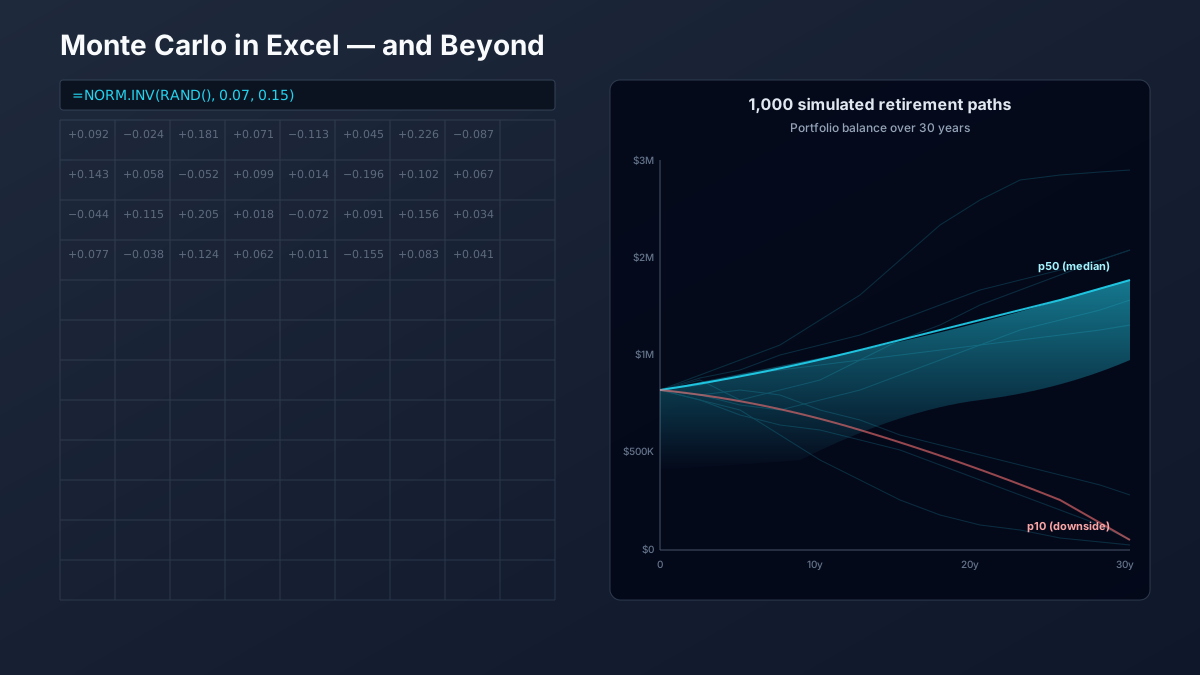
If you can write a NORM.INV(RAND(), 0.07, 0.15) formula, you can build a Monte Carlo retirement simulation in Excel. Plenty of retirees and engineers have done exactly that. The question this article answers: where does the Excel build serve you well, and where does it quietly mislead?
What a Monte Carlo simulation is doing (briefly)
A Monte Carlo retirement simulation runs your plan through many possible market sequences — typically 1,000 or more — and reports how many sequences leave you with money at end-of-plan. Each sequence draws a return for each year (from a distribution) and applies your contribution or withdrawal rule. The output is a success rate (e.g., 87%) and, ideally, a band of outcomes (10th / 50th / 90th percentile balances) so the user understands the dispersion, not just the headline.
For a longer methodology walk-through, see Monte Carlo Retirement Simulations: How They Work.
Building it in Excel: the minimum-viable formula stack
The simplest Excel build uses a Data Table or RANDARRAY (Excel 365) to repeat one experiment many times. A single experiment looks like:
# A1 = starting balance (e.g., 1,000,000)
# A2 = annual spending (e.g., 50,000)
# A3 = years (e.g., 30)
# A4 = expected return (e.g., 0.07)
# A5 = stdev (e.g., 0.15)

# Per-year return draw in column B (rows 2..A3+1):
B2: =NORM.INV(RAND(), $A$4, $A$5)

# Year-end balance in column C:
C2: =A1 * (1 + B2) - A2
C3: =C2 * (1 + B3) - A2        # repeat down
# ...

# Success of this trial (final balance > 0):
D1: =IF(C{A3+1} > 0, 1, 0)
Replicate the experiment 1,000+ times (Data Table, or recalculate-on-F9 with stored runs), then compute the success rate as =AVERAGE(D1:D1000). Output the 10th / 50th / 90th percentile of final balances via =PERCENTILE.INC(). That's a working Monte Carlo simulation.
What Excel gets right
- Transparency. Every cell is auditable. You can see exactly how a result is computed and trace any number back to its source. For learning what a Monte Carlo simulation actually does, Excel is unmatched.
- Auditability. If a colleague or advisor questions your model, you hand them the workbook and they can verify or challenge any cell. No black box.
- Prototyping speed. Adjusting an assumption (return, volatility, withdrawal amount) and recalculating is instant — no app reload, no API roundtrip.
- Customization. Need a specific withdrawal rule no commercial tool supports? Write it as a formula. Excel doesn't care.
What Excel gets wrong (the load-bearing section)
Each of these is correctable in Excel — but doing all of them correctly produces a workbook that's harder to audit than the purpose-built tools it was supposed to replace.
1. Volatility drag is mis-specified by default
The naive NORM.INV(RAND(), 0.07, 0.15) draws from a normal distribution centered on the arithmetic mean. For a portfolio held over time, the realized return is the geometric mean, which is lower by approximately σ²/2. At 15% volatility, that's a 1.1% headwind every year that the naive model ignores. The fix is to use a lognormal distribution (=EXP(NORM.INV(RAND(), μ, σ)) − 1) or to subtract σ²/2 from μ in the draw. Most Excel templates skip this — and overstate success by 5-10 percentage points over a 30-year horizon.
2. Sequence autocorrelation isn't IID
A naive draw treats each year's return as independent of the prior year (IID — independent and identically distributed). Real markets aren't IID. Bear markets cluster (volatility regimes), bull markets exhibit momentum, and fat tails are more common than a normal distribution predicts. The 2008-09 sequence wasn't two random independent years; it was one regime. Models that handle this (GARCH, regime-switching, bootstrap resampling of historical sequences) are mathematically tractable but extremely hard to express compactly in Excel cells.
3. Withdrawal rules beyond fixed-dollar are awkward
A fixed $50K/year withdrawal is one line. A variable percentage (e.g., 4% of current balance), a floor-and-ceiling rule (max +5% or −10% adjustment per year), or Guyton-Klinger guardrails require multi-cell IF cascades that quickly become unauditable. Most Excel templates default to fixed-dollar because of this — but fixed-dollar withdrawals overstate sequence-of-returns risk for any retiree who would, in reality, adjust spending in a down market.
4. Inflation is correlated with returns
Bond returns and inflation are negatively correlated. Stock real returns mean-revert against inflation over multi-year windows. Modeling inflation as an independent random walk (as most Excel templates do) overstates the risk of inflation eating real purchasing power — because in the real world, the negative correlation provides some hedging. Adding the correlation in Excel requires a multivariate normal draw via Cholesky decomposition, which most Excel users haven't implemented.
5. The tax cascade is hard to compact
Federal brackets stack on Social Security taxation thresholds, which stack on IRMAA cliffs, which stack on capital-gains brackets. Each is a step function. Expressing the full cascade for a multi-account withdrawal (Traditional + Roth + brokerage + Social Security + pension) in Excel typically requires either a 20+ column matrix per year (becomes unreadable) or VBA macros (defeats the "everyone-can-audit-it" advantage). For a deeper dive into what a tax optimizer actually models in this cascade, see the explainer on what a tax optimizer does.
6. Iteration count caps your statistical confidence
At 1,000 trials, the standard error on a success-rate estimate of 85% is about ±1.1 percentage points. Most practitioners want 10,000+ trials to get under ±0.4pp. Excel becomes painfully slow at 10K+ trials with a per-year withdrawal column — recalculation can take minutes, and the workbook becomes hard to share. Most Excel templates run 1,000 trials or fewer.
When the Excel build is the right answer
- Learning. If you want to internalize what a Monte Carlo simulation is doing, building one in Excel teaches you more in two hours than a hundred articles.
- Auditing. If you want to verify a commercial tool's output against a simple baseline (e.g., "does this tool's success rate roughly match a fixed-dollar Excel build with the same inputs?"), Excel is the right reference implementation.
- Prototyping. If you're sketching a new withdrawal rule or asset-allocation decision and want to see directional impact without setting up a full production model, Excel is faster.
When a purpose-built tool is the right answer
Once any of the following matter to your decision, the cost of getting them right in Excel exceeds the cost of using a tool that already does:
- Multi-year Roth conversion strategy with IRMAA-cliff avoidance
- Sequence-of-returns stress testing under fat-tail or historical-replay distributions
- Sensitivity analysis across multiple plan dimensions simultaneously (when does the optimal claim age change if spending changes?)
- Account-type-aware withdrawal sequencing with year-by-year tax cascade
- Inflation-correlated stochastic bond / equity / cash returns
A short comparison of options:
| Tool | Best at | Tradeoff |
|---|---|---|
| Excel (DIY) | Learning, auditing, fixed-dollar prototyping | Volatility drag and tax cascade are tedious to model correctly |
| R / Python (DIY) | Custom research, fat-tail and regime-switching distributions, GARCH | Requires programming; not usable by spouse / advisor unless they also code |
| Praxion | Multi-year Roth + IRMAA-aware withdrawal sequencing + integrated tax cascade | Free; opinions baked in (multi-account assumptions; certain bracket-fill defaults) |
| Schwab Income Planner | Account-holder integration with live Schwab balances | Schwab-account customers; limited stress scenarios |
| Boldin (formerly NewRetirement) | Comprehensive plan modeling with PlannerPlus subscription | Paid; complex UI; opinionated defaults |
Praxion is a decision-support tool, not a registered investment adviser. Comparison reflects publicly described tool features as of mid-2026; verify pricing and capabilities directly with each vendor.
The pragmatic recommendation
Build one in Excel to learn how it works. Use a purpose-built tool when the answer matters. The two aren't in opposition — the Excel build makes you a better consumer of the commercial tool, because you understand what the assumptions actually mean.
Want to compare your Excel build's output against a tool that handles the tax cascade and sequence-of-returns autocorrelation? Try Praxion's retirement simulator — it's free and you don't need to enter credit card details.